Note: This article was originally published in 2013. Some steps, commands, or software versions may have changed. Check the current Java documentation for the latest information.
In this step-by-step guide, you’ll learn resolve: microsoft jscript compilation error - syntax error.
How to Resolve: (http://msdn.microsoft.com/en-us/library/hbxc2t98\(VS.85\).aspx “JScript”) compilation error - Syntax error
I am very confused what is the cause for this error, as the solution for it is changing a setting that comes by default in all computers and I’ve had it for a while. If anyone can identify the root of the problem and how to resolve it via an alternative method please do share!
(http://kx.cloudingenium.com/wp-content/uploads/sites/3/2013/12/Microsoft-JScript-compilation-error-Syntax-Error-Warning.gif)](http://kx.cloudingenium.com/wp-content/uploads/sites/3/2013/12/Microsoft-JScript-compilation-error-Syntax-Error-Warning.gif)
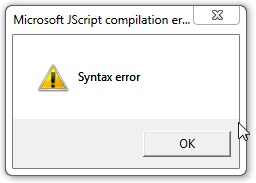
Microsoft JScript compilation error - Syntax Error Warning
This error seems to not affect the application, but will pop-up everytime you try to do anything with Java (be it a web application on your browser or a java binary on your computer). The error pops-up several times at the beginning until the app is completely launched. Although there seems to be no impact on the application it is something rather annoying. To make things worse even if you try to completely uninstall Java and reinstall it the problem is still there. I have several Windows 8 computers and this is the only one experiencing the issue.
The solution although simple baffles me as I am not sure how that setting causes the problem:
- Open Internet Explorer
- Go to:
- Tools
- Internet Options
- Connections
- LAN Settings
- Connections
- Internet Options
- Tools
- Go to:
- Clear the checkbox in ”Automatically detect settings ”****
(http://img.zemanta.com/zemified_h.png?x-id=3bcb94c0-07dc-4f4e-817e-51f283dfe497)](http://www.zemanta.com/?px “Enhanced by Zemanta”)

Summary
You’ve successfully learned resolve: microsoft jscript compilation error - syntax error. If you run into any issues, double-check the prerequisites and ensure your Java environment is properly configured.